What it does
Asks one thing at a time and ends with a price estimate. Contact details come last.


Lead form
The form asks one thing at a time and ends with a price estimate. You get a quote request that already includes scope, timeline, location and contact details.
Revdash reads your site · knowledge base · bot in your inbox
Thanks. Your bot is on its way.
Revdash is building a bot from your site, and the link will be in your inbox in 10 minutes. If it does not show up, check your spam folder or email info@revdot.ai.
Enter your address and email. Revdash builds a bot from your site content and emails you the link in 10 minutes.
What do you need?
How big is the space?
What is your timeline?
Where is the property?
Where should we send the estimate?
Quote request readyAll answers in your inbox at once
Price estimate6,500–9,000 €A range, subject to a site visit
At a glance
Eight things worth knowing before you replace your current contact form.
Asks one thing at a time and ends with a price estimate. Contact details come last.
Businesses whose sales start with a quote request: contracting, projects and service contracts. In an online store, the shopping assistant does the same job.
By plan: Starter 1 language, Pro 2, Business 3, Scale all.
Embedded in the page or behind a button. The same snippet as the other products, and you do not have to publish the chatbot.
Every answer in one email. From Pro up, also to your CRM or via webhook.
See how far a visitor got and what they answered, even when no contact details came in.
Built in Finland, hosted in the EU. The app server runs at Hetzner in Helsinki. A data processing agreement is available.
Included in Starter, 39 €/mo. No separate subscription, and completed forms do not count toward your conversation quota.
Starter39 €/mo
All plans on the pricing pageWhat it does
Visitors do not see the whole effort up front, so they start. A form they have started gets finished, and you get a quote request with the groundwork already done.

Every answer arrives in your inbox or CRM at once, in order. You never call back with just a name and a number to go on, and the price estimate filters out no-budget inquiries before the first sales call.
You see how far the visitor got and what they answered. It also shows where your question flow causes friction.
Question flow
The questions change by industry, the order stays. Visitors see a progress bar the whole way.
3–5 options with pictures and a single click. An easy start gets the visitor moving.
Square footage, quantity or headcount: whatever sets the price in your line of work.
Urgency separates warm leads from cold ones better than any other question.
The thing you would otherwise ask on the phone.
Name, email and phone last, followed right away by the price estimate.
Every answer in your inbox or CRM at once, in order.
How it works
Use the flow for your industry as is or adapt it to how you sell. The path branches on the answers without any code, or we build it for you.
Question flow
A base price, multipliers and add-ons are tied to the answers. The estimate shows as a range with a caveat, or you can hide it.
The same single snippet as the other products, inside the page or behind a button. Each completed form lands in your inbox in one piece.
<script src="…/revdot.js" data-widget="rw…">
Industries
Six industries, six ready-made question flows. Use a flow as is or adapt it to your own sales process.
| Industry | The deciding question | What else to ask |
|---|---|---|
| Construction and remodeling | Property type and square footage | Timeline, whether plans are ready, location, whether HOA approval is needed |
| Electrical work | New build or renovation | Square footage, urgency, whether there is an electrical plan, location |
| Plumbing, heating and ventilation | Age of the current system | Building type, square footage, whether the fault is urgent, location |
| Moving services | From where to where, and when | Number of rooms, elevator at both ends, whether packing is needed |
| Cleaning | One-off or recurring | Square footage, frequency, property type, start date |
| Painting and coatings | Surface area and material | Indoor or outdoor, condition, timeline, whether scaffolding is needed |
How many more leads?
It varies by industry and by the order of the questions. Do not trust anyone’s blanket percentage; measure it on your own site instead. The dashboard shows the completion rate step by step.





Pricing
The form comes with even the smallest plan, because it is often the best place to start. All products share one dashboard, so you need no separate subscription.
39 €/mo
300 conversations / mo372 €/year
For a small site that wants every quote request captured.
79 €/mo
1,000 conversations / mo756 €/year
For a service business that gets the same questions every day.
Completed forms do not count toward your conversation quota. The form is also included in Business (149 €/mo) and Scale (from 249 €/mo).
Build it yourself at the same monthly price, or we build it for 290 € (Business and Scale 490 €), 0 € on an annual plan. Prices are in euros, excluding VAT.
Full pricing and comparisonA regular contact form asks for a name and number first, and many visitors close it before they get anything in return. The lead form asks one thing at a time, saves contact details for last and ends with a price estimate. You get a quote request that already includes scope, timeline and location.
From rules you set yourself: a base price, multipliers and add-ons tied to the answers. The estimate always shows as a range with a caveat, so it does not commit you to a quote. If your pricing does not fit a formula, you can hide the estimate completely.
Yes. The lead form is included in Starter (39 €/mo), and you do not have to publish the chatbot. Plenty of customers start with the form alone and switch the chatbot on later.
The dashboard shows how far the visitor got and what they answered. If the email address came in, you can send a reminder. Even without contact details the data is worth reading: it shows where your question flow causes friction.
No. Completed forms do not count toward the conversation quota, whether the form has four questions or ten and whether you get five forms or five hundred. Only bot conversations count.
Yes. The path branches on earlier answers, so a remodeling customer never sees new-build questions. You set up the branching in the dashboard without code.
Products
All products share one knowledge base, one conversation quota and one dashboard. Your plan decides which ones are on.
 All plansChatbotAnswers questions and asks for contact details.Waits in the corner of the page and answers at 10.40 pm too.Learn more
 Pro, Business and ScaleInline botAnswers inside the page, no list of results.Embedded right where visitors need help on the page.Learn more
 From BusinessShopping assistantRecommends 2–5 products and links to the product page.Also answers shipping questions, and the dashboard shows what customers ask.Learn more
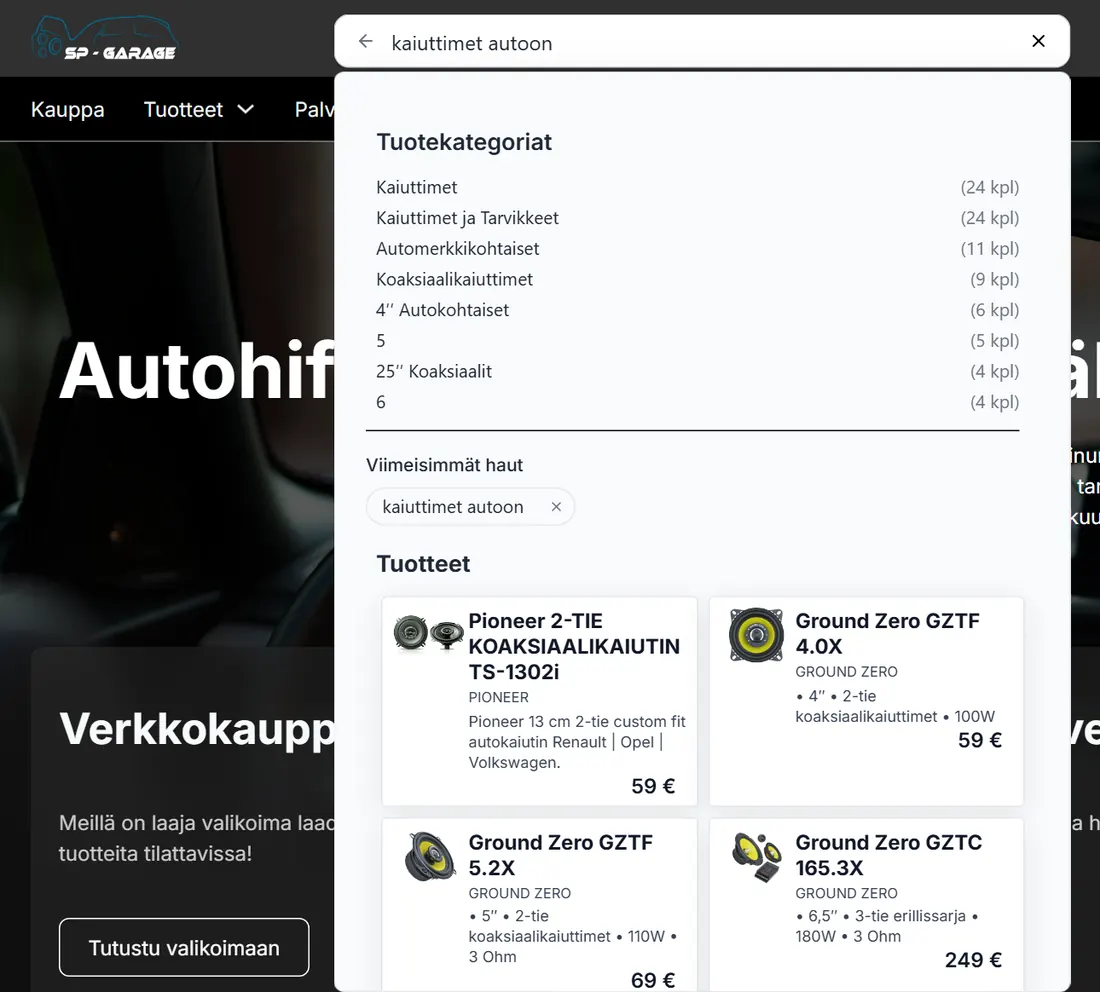 All plansAI site searchStore search that understands a question in the shopper’s own words.Shows matching products, categories and pages under the search.Learn more
Try it on your site
Enter your address and email: Revdash builds the bot from your site content and emails you the link in 10 minutes. You build the form’s question flow in the dashboard, or we build it for you.
Revdash reads your site · knowledge base · bot in your inbox
Thanks. Your bot is on its way.
Revdash is building a bot from your site, and the link will be in your inbox in 10 minutes. If it does not show up, check your spam folder or email info@revdot.ai.
The Revdot team answers in person:WhatsAppBook a call+358 45 231 1420eelis@revdot.ai