

What it does
Asks what the product is for, recommends 2–5 products with reasons and answers shipping, sizing and returns questions.


Shopping assistant
The assistant asks what the product is for, recommends 2–5 products with reasons and answers shipping and returns questions. Revdash shows you what your customers ask.
Revdash reads your site · knowledge base · bot in your inbox
Thanks. Your bot is on its way.
Revdash is building a bot from your site, and the link will be in your inbox in 10 minutes. If it does not show up, check your spam folder or email info@revdot.ai.
Enter your store address and email. A bot built from your site arrives by email in 10 minutes, and product recommendations in a carousel come with the Business plan.
At a glance
The same checklist you go through with every vendor. The fine print is on the pricing page and in the privacy policy.
Asks what the product is for, recommends 2–5 products with reasons and answers shipping, sizing and returns questions.
Stores whose products need comparing and whose support inbox gets the same questions every day.
Business 3 languages, Scale all. The assistant replies in the shopper’s language from the same knowledge base.
Chat in your store, with products as a carousel inside the conversation. WhatsApp button and quick replies included.
Order questions go to a person by email. Leads go to email, your CRM or a webhook.
Ready-made integrations: Shopify, WooCommerce and the Nordic platforms MyCashflow and Shuriken. Anything else works through a product feed, such as Google Shopping.
Built in Finland, hosted in the EU. GDPR-compliant processing on an app server at Hetzner in Helsinki. DPA available.
Business 149 €/mo, 2,000 conversations a month. Scale from 249 €/mo.
Business149 €/mo
All plans on the pricing pageWhat it does
Customers ask which bike suits them, whether it can ship by Friday and how returns work. The assistant answers all of it from the same product data and your published terms.

Two to five options with reasons, not a full page of search results. The products show as a carousel in the same conversation, and the customer goes straight from there to the product page.
Based on your published terms, never promising a day more than you do. Questions about the status of a single order go to a person.
How it works
A standard feed, such as Google Shopping, works as is. Ready-made integrations: Shopify, WooCommerce, MyCashflow and Shuriken.
Ask the same things your customers ask. Fix wrong information in the dashboard, and the fix shows up in the next conversation.
Which frame size fits someone 5 ft 10 in?
Size M. A low frame makes it easier to get on and off.Source: size chart
Works on Shopify, WooCommerce and any platform that accepts a script. No plugin to install or update.
<script src="…/revdot.js" data-widget="rw…">
The same line of code works on platforms like these:



Analytics
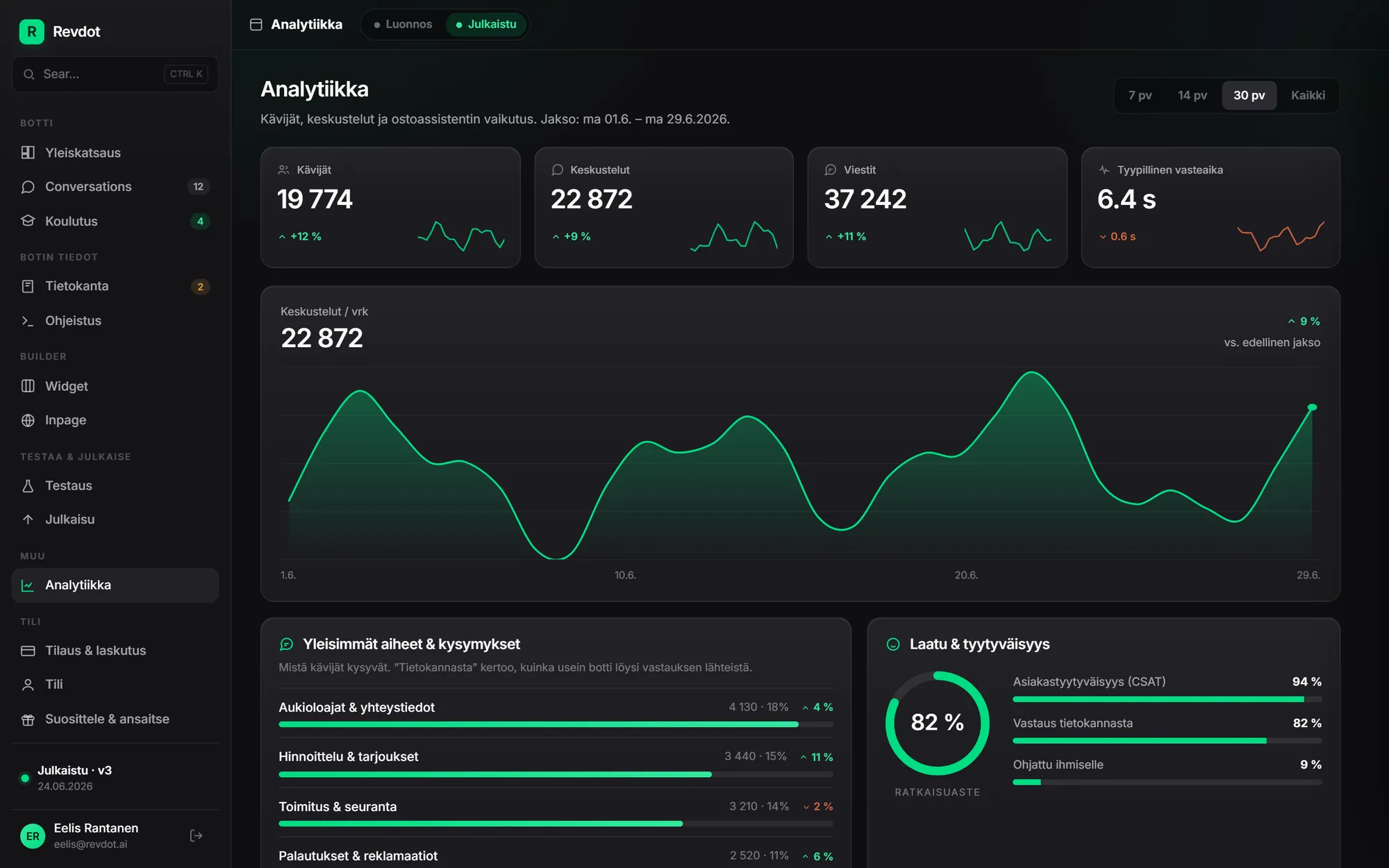
Every conversation is saved. Revdash pulls out the top topics, the resolution rate and the questions the assistant could not answer. That is data your store analytics will never show you.
What to do with the data. When the same question goes unanswered week after week, add the answer to the product page or the knowledge base. The assistant can answer it in the very next conversation.

ebikecenter.fi
ebikecenter.fi sells e-bikes online. Conversations are saved in full, and the first week of conversations showed that many buyers were looking for a bike under 2,000 euros.
One store, one week. Results vary with product range and traffic.
Read the Ebike Center casePricing
Product recommendations, the carousel and the database integration are Business features. All five products sit in the same subscription and share one conversation quota.
149 €/mo
2,000 conversations / mo1,428 €/year
For online stores and busy support teams.
from249 €/mo
4,000 conversations / mo
For several sites and integrations, with a named contact person.
Setup and installation on Business and Scale 490 €, or 0 € on an annual plan. Extra conversations 8 € per 100. For several sites or custom integrations, choose Scale.
No, as long as stock data is in the feed. The assistant leaves sold-out items out of its recommendations and suggests an alternative. It does not know when an item will be back in stock: it says so plainly and points the shopper to customer service. It never guesses a date.
No. The assistant is not connected to your store platform’s order data, so it cannot see a logged-in customer’s orders or the status of a single package. It answers from your product data and published terms and hands order questions to a person.
Only if you write the rules. By default it does not negotiate prices or promise discounts. You can give it, for example, one campaign code for specific situations.
From an hour to a few hours, depending on the size of your catalog. The time goes into reading the feed and training, and you review the answers yourself before you publish.
Fix it in the dashboard right away, and the fix shows up in the next conversation. You can read every conversation word for word in the dashboard. If the assistant does not know the answer, it says so instead of guessing.
In a single-product store or a simple catalog, yes. A rule of thumb: if your support team gets a “which product suits what” question every week, the assistant will earn its keep. Otherwise the chatbot widget handles support, from 39 €/mo.
Products
All products share one knowledge base, one conversation quota and one dashboard. Your plan decides which ones are on.
 All plansChatbotAnswers questions and asks for contact details.Waits in the corner of the page and answers at 10.40 pm too.Learn more
 All plansLead formTakes a quote request one question at a time.Ends with a price estimate, and the lead lands in your inbox.Learn more
 Pro, Business and ScaleInline botAnswers inside the page, no list of results.Embedded right where visitors need help on the page.Learn more
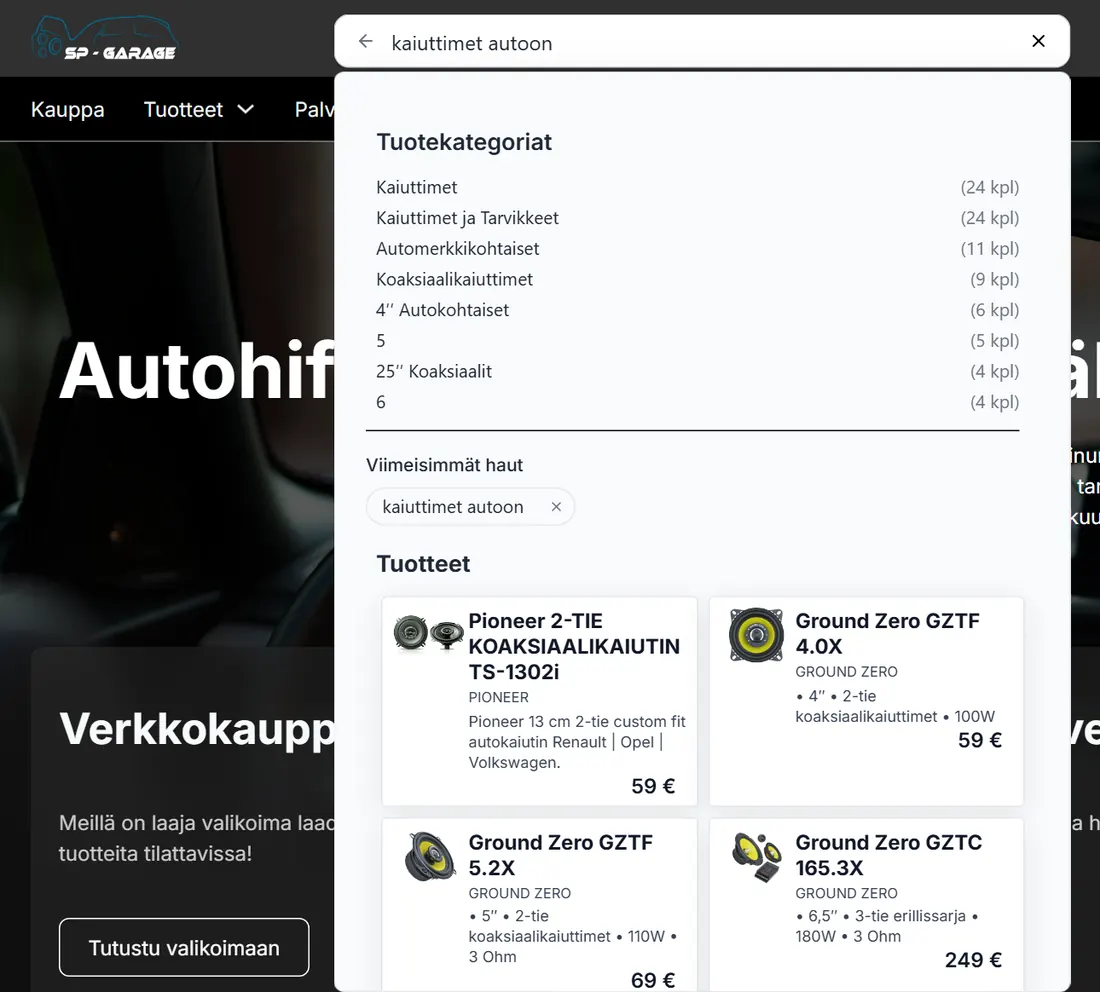 All plansAI site searchStore search that understands a question in the shopper’s own words.Shows matching products, categories and pages under the search.Learn more
Try it on your site
Enter your store address and email. Then ask the bot what your shoppers ask before they buy: size, shipping and returns.
Revdash reads your site · knowledge base · bot in your inbox
Thanks. Your bot is on its way.
Revdash is building a bot from your site, and the link will be in your inbox in 10 minutes. If it does not show up, check your spam folder or email info@revdot.ai.
The Revdot team answers in person:WhatsAppBook a call+358 45 231 1420eelis@revdot.ai